Hey all you WOOFers,
We're coming up on finals week, and that means that WOOF is going to slowing down a bit. As such, there will be NO General Project Discussion or General Workdays this Monday or Friday.
So start cramming! WOOF will be back when Spring quarter starts up.
See you all then
Saturday, March 16, 2013

Sunday, March 3, 2013
General Project Discussion, now in the workroom!
Hey all you WOOFers!
Our General Project Discussion is happening March 4th (Monday) from 4:30 to 5:30. Since we've finally got our workroom back, we're going to use it!
Meet in the WOOF room (MEB 252) tomorrow, March 4th to discuss some projects!
Tomorrow we'll have a focus on administrative things. Budgets, progress reports, and the like. If you are or are interested in being a project lead, you should really try to attend this discussion.
Once the budgets are sorted out, the ball can get rolling on some of these projects!
Our General Project Discussion is happening March 4th (Monday) from 4:30 to 5:30. Since we've finally got our workroom back, we're going to use it!
Meet in the WOOF room (MEB 252) tomorrow, March 4th to discuss some projects!
Tomorrow we'll have a focus on administrative things. Budgets, progress reports, and the like. If you are or are interested in being a project lead, you should really try to attend this discussion.
Once the budgets are sorted out, the ball can get rolling on some of these projects!
Wednesday, February 27, 2013
Build Days are Back
Hi WOOFers,
Just a quick reminder that our room is now available to us again and therefore we will resume open workshop on Fridays from noon-5pm.
This week there will be pizza and soda at noon. Come on by to eat, work on your Grawmet, talk about 3D printing, learn from each other, get the ball rolling on group projects, and any other 3DP related stuff you want to do.
We hope to see you on Friday!
-Mark Hanson
Just a quick reminder that our room is now available to us again and therefore we will resume open workshop on Fridays from noon-5pm.
This week there will be pizza and soda at noon. Come on by to eat, work on your Grawmet, talk about 3D printing, learn from each other, get the ball rolling on group projects, and any other 3DP related stuff you want to do.
We hope to see you on Friday!
-Mark Hanson
Sunday, February 24, 2013
WOOF's Second General Project Discussion
Hey you WOOFers!
Our second General Project Discussion is happening tomorrow, February 25th, from 4:30 to 5:30. It will be held in MEB 242 (NOT our normal workroom). Hope to see you there!
These discussion will be a weekly thing hopefully, so if you can't make it this week, just come the next!
Our second General Project Discussion is happening tomorrow, February 25th, from 4:30 to 5:30. It will be held in MEB 242 (NOT our normal workroom). Hope to see you there!
These discussion will be a weekly thing hopefully, so if you can't make it this week, just come the next!
Tuesday, February 19, 2013
General Project Discussion
Just a quick reminder, there will be WOOF's first ever General Project Discussion in MEB 242 (Not out normal workroom!) tomorrow, February 19th.
We're starting at 4:30, so feel free to stop by and see what's up! We'll be introducing some club wide projects for people to work on. These are projects that will be funded by WOOF, so it's a great opportunity for anyone who is new to 3D printing, and doesn't want to purchase a Grawmet kit just yet. Some projects that we're considering are designing the milk jug derby boat, and building a 3D scanner.
Come on down, have some snacks, and join in the discussion!
See you there!
We're starting at 4:30, so feel free to stop by and see what's up! We'll be introducing some club wide projects for people to work on. These are projects that will be funded by WOOF, so it's a great opportunity for anyone who is new to 3D printing, and doesn't want to purchase a Grawmet kit just yet. Some projects that we're considering are designing the milk jug derby boat, and building a 3D scanner.
Come on down, have some snacks, and join in the discussion!
See you there!
Wednesday, February 6, 2013
Tutorials and This Friday
The Grawmet Builds will continue in the old WOOF office in the basement of Loew. We will be passing our emails out before the WOOF dinner, so individuals can make appointments. All appointments will be posted on the blog, so feel free to swing by Loew if you want to listen in. These are one-on-one tutorials, where you can schedule an appointment with either Mark Hanson or Brandon Bowman, for assembly, troubleshooting, flashing firmware, etc. Come in, let us know where you are at, and we will help you make some progress.
We will be handing out our emails to those who want to schedule an appointment.
Bowman is available anytime Monday-Thursday excluding MW2:30-3:30pm
Hanson is available: M after 2:30, T 10:30-2:30, W 12:30-1:30, 2:30-4:00, Th until 4:00, and F 10:30-5.

Matt Johnson has volunteered to take on designing and printing the WOOF boat for this year's Seafair Milk Carton Regatta.
For those of you who are unfamiliar with the Milk Carton Derby (or want more information) check out this link:
Saturday July 13, 2013

Location: Green Lake
Time: 10:00 am - 4:00 pm


See you on Friday!
-Brandon Bowman and Mark Hanson
Thursday, January 31, 2013
Fridays collaborations
Since the room will not be available for Build Days the next few weeks we are planning on a group dinner for the next three Fridays. All WOOFers are welcome the idea is to gather around and talk about ideas and collaboration. WOOF has several projects coming up.
Making a 3D scanner.
The 2nd Grawmet revision.
Design the boat for Seafair.
So bring your ideas to the table and we can talk about the list above, or anything else that gets suggested.
Dinner meet at the WOOF room
(MEB 252) Friday 5:00-5:30pm
We will decide on a venue between 5:00 and 5:30pm
Splitting up big checks with cards is tough, so consider bringing $10-15 cash because
You can RSVP by leaving a comment.
~Brandon B.
Making a 3D scanner.
The 2nd Grawmet revision.
Design the boat for Seafair.
So bring your ideas to the table and we can talk about the list above, or anything else that gets suggested.
Dinner meet at the WOOF room
(MEB 252) Friday 5:00-5:30pm
We will decide on a venue between 5:00 and 5:30pm
Splitting up big checks with cards is tough, so consider bringing $10-15 cash because
You can RSVP by leaving a comment.
~Brandon B.
Tuesday, January 29, 2013
Notice of Room Use
The ME department has been very kind to allow us to use ME 252 as our home base. This term, the ME 356 class will need to use the room for approximately 3 weeks for a class project. In order to help make the room work well for ME 356, we are asking all WOOF members to remove their personal belongings from the room. This means printers, parts, tools etc. The more stuff we can temporarily remove, the easier it will be for ME 356. Let's make it as convenient for them as possible so that we are welcomed back. Any items that are not removed will be temporarily hidden in Big Red or stored along the window sill. This all needs happen by this Thursday. Sorry for the short notice. If you'd like to pick up something and need to be let into the room send an email to any of the officers or email woof3d@uw.edu.
During the next few weeks, plan on having very limited access, if any, to the WOOF room.
Please spread the word. This needs to happen this week.
Thanks,
Matt
During the next few weeks, plan on having very limited access, if any, to the WOOF room.
Please spread the word. This needs to happen this week.
Thanks,
Matt
Friday, January 25, 2013
ME 495 Capstone w/ WOOF
Hey WOOF graduating seniors,
I am trying to get a feel for WOOF members who are planning to/would like to still do a capstone with a WOOF project next quarter. Prof. Ganter right now is really interested in doing a Stonespray attachment to the large printer that is being build this quarter: http://www.stonespray.com/
Send me an e-mail if you would like to do this as your capstone: washuu-at-uw.edu
Bethany
I am trying to get a feel for WOOF members who are planning to/would like to still do a capstone with a WOOF project next quarter. Prof. Ganter right now is really interested in doing a Stonespray attachment to the large printer that is being build this quarter: http://www.stonespray.com/
Send me an e-mail if you would like to do this as your capstone: washuu-at-uw.edu
Bethany
Tuesday, January 22, 2013
First Grawmet Print!
That's right! The Grawmet kits are finally getting to the point of printing!
WOOF member Bing had the following to say about his Grawmet:
WOOF member Bing had the following to say about his Grawmet:
Here it is! My first somewhat successful print with the Grawmet - a BOX! Since the thing isn't calibrated correctly the box is very squished along the Z-axis.Way to go, Bing!
 |
| The first working Grawmet! |
Monday, January 21, 2013
Scholarship Opportunity
Dear University of
Washington STEM Students,
The Astronaut
Scholarship Foundation (ASF) is offering a competitive $10,000 scholarship for
University of Washington students who are in Science, Technology,
Engineering, or Math (STEM) disciplines. Awardees will
receive funding for their 2013-2014 academic year.
All motivated STEM
students, who have demonstrated success in both their course work and research projects, are
encouraged to apply. Space Grant must receive all materials by 5pm on March 1, 2013.
Furthermore, Space Grant will notify applicants of their application status
by March 5, 2013.
Student Eligibility
and Application process:
-Must be a United States
citizen
-Application must
include a letter of reference and cover sheet completed by at least one
faculty member who has worked closely with you
-Must hold either
junior or senior status at the beginning of the
2013-2014 academic
year
Nomination documents
and details may be downloaded from:
All application
materials must be sent to the Space Grant main office at:
WA NASA Space
Grant
Attn: Astronaut
Scholarship Foundation
Johnson
141
Box
351310
Seattle, WA
98195
As general advice, be
proactive by downloading the application materials and set-up a meeting with a faculty
member to discuss your application. Ensure that your application is
complete by ensuring that all documents are included and double check for
typos, grammar and such.
I am here to help, so
please feel free to contact me regarding this opportunity at jcc5@uw.edu.
Answers to Frequently Asked Questions may be found at the provided link
above.
* * * * * * * * * * *
* * * *
J.Carlos
Chavez
Student Program
Coordinator and Advisor
Washington NASA Space
Grant
Wednesday, January 9, 2013
WOOF in Winter Quarter
Hey Fabbers,
For now the workshop open days will continue on Fridays.
Where: ME 252
When: Every Friday Noon - 5pm
Winter Quarter General Meeting
Where: ME 252
When: Thurs 17 @ 3:30pm
What's covered:
For now the workshop open days will continue on Fridays.
Where: ME 252
When: Every Friday Noon - 5pm
Winter Quarter General Meeting
Where: ME 252
When: Thurs 17 @ 3:30pm
What's covered:
- New Officers - open call for officers for next school year
- Grawmet Winter Build
- Project: Big Red and the Seafair Boat
Wednesday, January 2, 2013
Jan 4 Open WOOF Room
Happy New Year!
The first Open WOOF room of the year will be held:
Friday Jan 4
from 12:00 - 5:00pm
in ME 252
Come in for help, fun, and companionship!
Beth
The first Open WOOF room of the year will be held:
Friday Jan 4
from 12:00 - 5:00pm
in ME 252
Come in for help, fun, and companionship!
Beth
Saturday, December 29, 2012
WOOFer Talks 3D Printing on WGWX Kid's Brain
Our very own Quinn was interviewed last week on WGWX's radio show Kid's Brain talking about her experiences building her Grawmet with us.
Check it out at:
http://wgxc.org/archives/5651
Good job Quinn!
Bethany
Check it out at:
http://wgxc.org/archives/5651
Good job Quinn!
Bethany
Wednesday, December 26, 2012
Open work day Friday 12- 27- 2012
The room will be open Noon-5:00pm for those of you who are still in town. Need help building your bot, crimping, BLS connectors, wiring or flashing your board come in. We can get you up to speed. This includes any of you reprappers who may still be having trouble.
~Brandon B.
~Brandon B.
Friday, December 21, 2012
If your brainwave's got no brains, or your board is hiding from windows.
Come in and get your boards flashed, the Brainwaves can talk to both Mac and Windows, or just come in to work on the Build.
http://printrbot.com/wp-content/uploads/2012/04/Printrbot-Getting-Started-Guide2.pdf
or the individual links:
Pronterface http://koti.kapsi.fi/~kliment/printrun/
Slic3r http://slic3r.org/
Windows COM Port .INF Walkthrough.


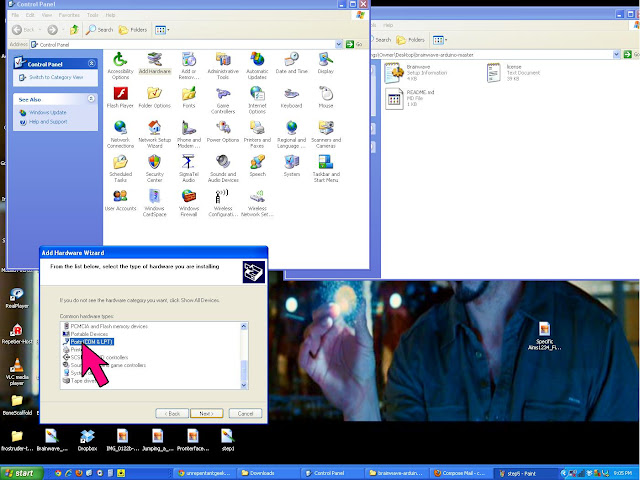


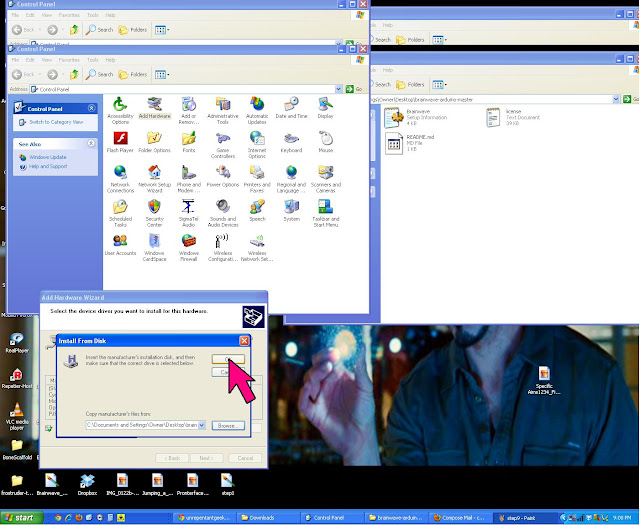


Open Pronterface, make sure it connect and test the bots ability to move heat, call temps and extrude.
If you are still having trouble connecting to the board via Pronterface, restart the computer and try to connect to Pronterface again. If Pronterface still can't connect, right click "My Computer" select properties and make sure to check the hardware for COM# (click properties is set to the Baudrate to 115200, sometimes it will default to something silly like 9600.

Good Luck
~Bowman
 |
| Brainwave Board Wiring Diagram |
Requirements For Mac and Windows
1) Install Arduino 1.0.2
2) install the brainwave-arduino bundle from
https://github.com/
3) Download this branch of Marlin:
https://github.com/
https://github.com/
3) Download this branch of Marlin:
https://github.com/
The brainwave folder needs to be in Arduino right click it (control click for macs) for show package contents. Store brainwave folder in the hardware folder be sure to take the Brainwave file out of the first folder it has trouble seeing out side itself.
Walkthrough (Mac & Windows)
In Ardiuno 1.0.2 set your board. Tools => Board => Brainwave (see image).
Hook the board up to the computer with the tinyUSB press program.
In Tools => serial port the board should be recognized as a COM PORT# (PC) tty.usb modem131 (Mac) select that.
In the sketch open Marlin.pde (I stored this file in firmware in the Brainwave folder so I wouldn't lose it) this will be converted to Marlin.ino afterwards
Set Motherboard to 82 (found in Configuration.h)
Click Verify sketch (check mark symbol)
If there are no error messages
Click compile (arrow symbol)
It should write the firmware directly to your board. To confirm with open Pronterface set the Baudrate: 115200 and see if you can driver the bot around. Motors should spin heaters should warm up, and temperature readings should be accurate.
Pronterface & Slicer
If you haven't installed pronterface or slicer, you will need to. Printrbot.com has the best walkthrough (link below) I strongly suggest you read through the through entire PDF to ease the calibration. (I frequently reference pages 1 and 4 for beginners)
or the individual links:
Pronterface http://koti.kapsi.fi/~kliment/printrun/
Slic3r http://slic3r.org/
Never unplug a stepper motor when the board is on, otherwise you'll get a demo of how to replace a fried driver. (I stand corrected Mr. Wilson)
If you have a PC the COM PORT will disappear after the board has been flashed with the correct firmware. In the brainwave Arduino Folder there is a Brainwave.INF file this will allow you board to talk to computer as a COM PORT.
Windows COM Port .INF Walkthrough.
"How to find the Brainwave COM PORT in Windows XP (this also works for Windows 7)"

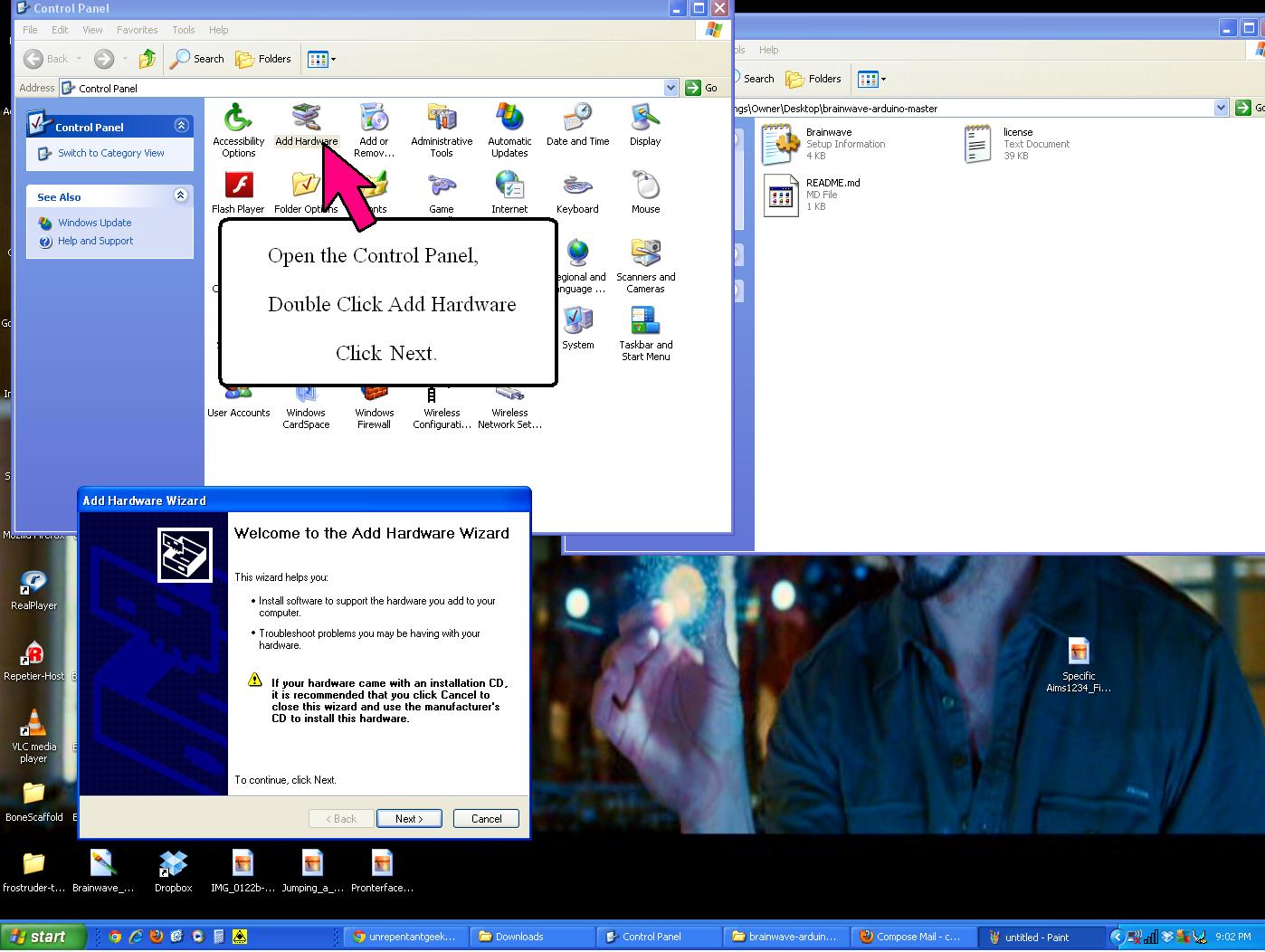


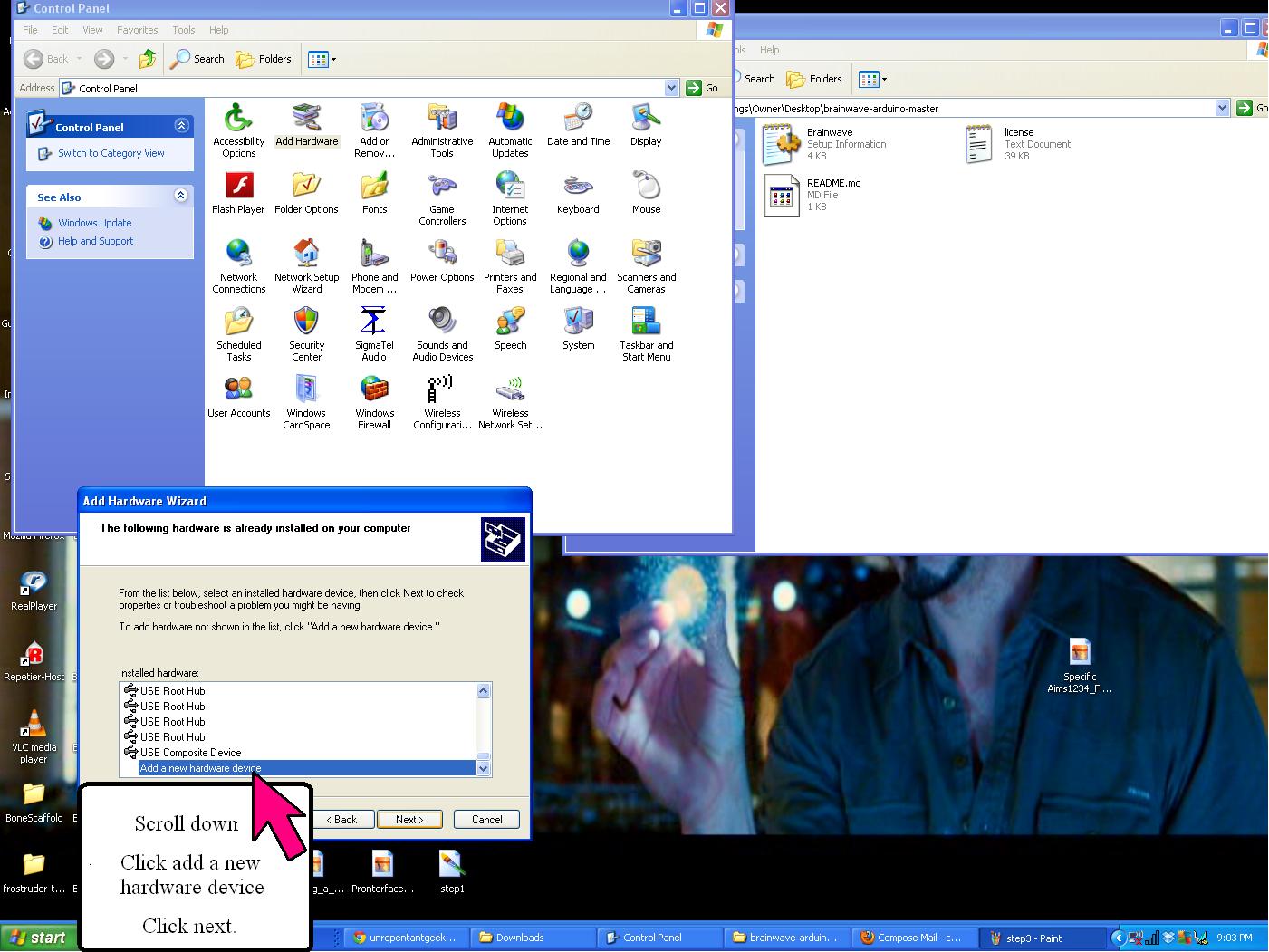


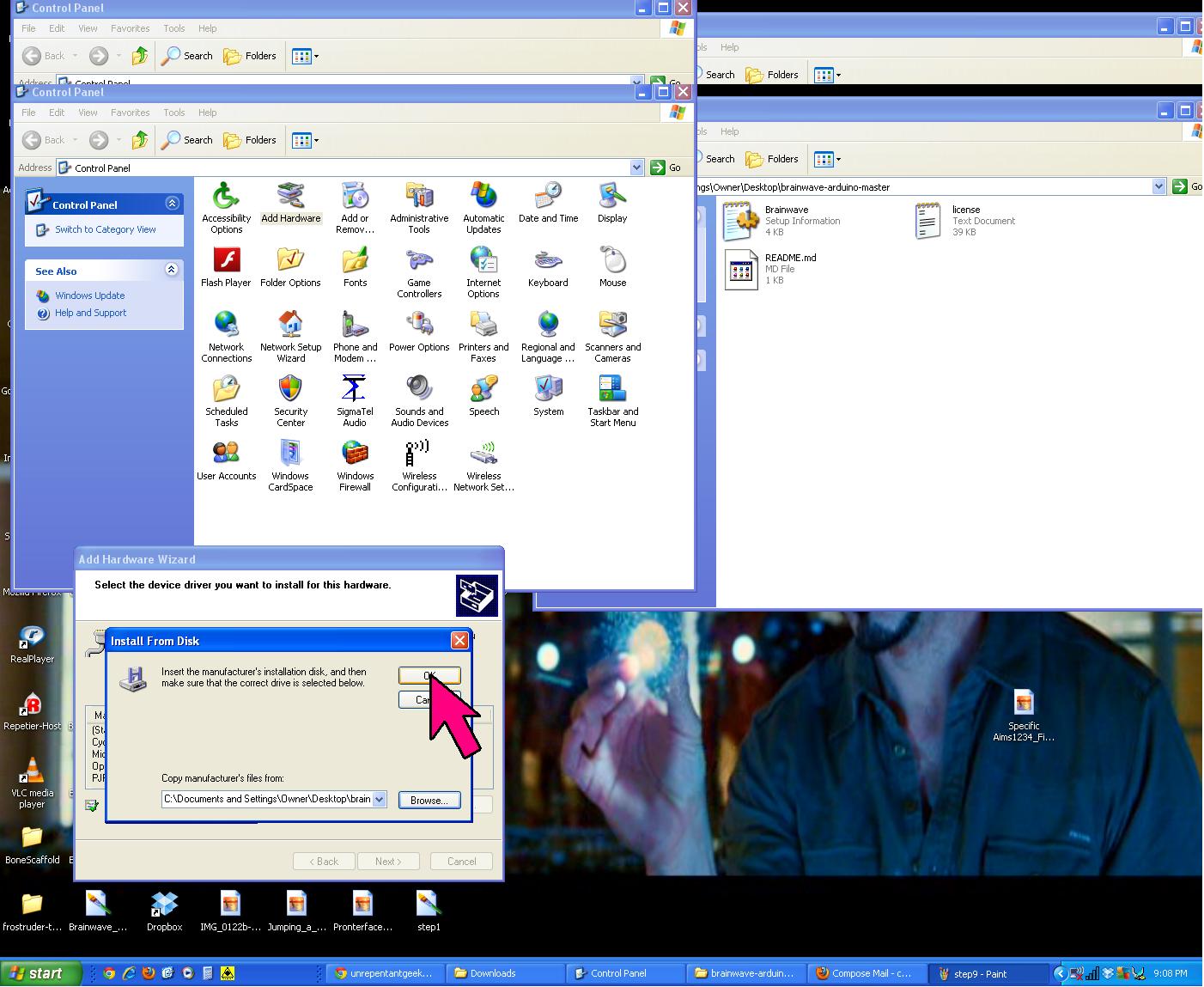


If you are still having trouble connecting to the board via Pronterface, restart the computer and try to connect to Pronterface again. If Pronterface still can't connect, right click "My Computer" select properties and make sure to check the hardware for COM# (click properties is set to the Baudrate to 115200, sometimes it will default to something silly like 9600.

Good Luck
~Bowman
Tuesday, December 18, 2012
Open Workshop this Friday (Dec 21)
Hey all,
The workshop will be open this Friday December 21: 12:00-5pm
~Bethany
The workshop will be open this Friday December 21: 12:00-5pm
~Bethany
Friday, December 14, 2012
No Open Workroom Today
This is just a reminder that there will be no open workroom hours today. So if you were planning a special trip into school just for that, stay home and enjoy some much deserved down time.
This probably doesn't affect too many of you, but it is likely that our open workshop hours will be modified for the duration of the break. As soon as the officers get that figured out we'll post it here.
Yours in Printing,
Mark
Friday, December 7, 2012
Workday Vote
The room will be open Noon to 5pm on Saturday. If you want a chance to get intensives, tutorials, troubleshooting, or unwind from studying on finals, I (Brandon B.) will be in there to help you with anything I can. Reprappers come in too if you are still having trouble.
Since I cannot be present for the build day this coming Friday, I am offering two days for builds. As always noon-5:00pm and pick a Monday or Wednesday
... and a Tuesday or Thursday.
Vote in comment section example Brandon B. Monday & Thursday.
Thursday seems to be definitive.
I will post the decision on Monday or Wednesday tonight @ 9:00pm
Ok so it is 10:30pm, and I veto Wednesday for Monday... because ,well, everyone but Ben can make it Thursday. Sorry Bing.
The WOOF room will be open for build days
Monday Dec 10th Noon -5:00pm
Thursday Dec 13th Noon -5:00pm
Hope to see your there,
~Brandon B.
Since I cannot be present for the build day this coming Friday, I am offering two days for builds. As always noon-5:00pm and pick a Monday or Wednesday
... and a Tuesday or Thursday.
Vote in comment section example Brandon B. Monday & Thursday.
Thursday seems to be definitive.
I will post the decision on Monday or Wednesday tonight @ 9:00pm
Ok so it is 10:30pm, and I veto Wednesday for Monday... because ,well, everyone but Ben can make it Thursday. Sorry Bing.
The WOOF room will be open for build days
Monday Dec 10th Noon -5:00pm
Thursday Dec 13th Noon -5:00pm
Hope to see your there,
~Brandon B.
Wednesday, December 5, 2012
Keep it clean, folks
With our recent influx of Grawmet orders, people have been excited to work on their 3D printers. Club members are free to use the workshop and our tools to help them with the Grawmet, Clonedel, or any other project you may have. Before one gains access to all of this, you must go through a safety briefing with one of WOOF's officers. One of the first things we go over in the briefing is cleanliness.
If you make a mess while working, you are expected to clean it up. You should always allot yourself 5-10 minutes at the end of a work session to tidy up your area. Some examples of tidying up include:
If you make a mess while working, you are expected to clean it up. You should always allot yourself 5-10 minutes at the end of a work session to tidy up your area. Some examples of tidying up include:
- Putting tools back
- Don't leave calipers, screwdrivers, etc. out on the table. Tools should be put back when you are done with the tool, not when you are done working. (This goes double for the calipers, they should be placed back into their case to avoid breaking them)
- If you take a drill bit off of the drill press or a hand drill, DO NOT place it on the table. It goes back in it's appropriate place immediately. This makes it easy to find the drill bit size that you want later. We have already lost 2-3 drill bits.
- Unplug and store power tools (This does not apply to stationary tools like the drill press). Dremels, heat guns, etc. should not be left out on the table, and should definitely not be left plugged in.
- Sweeping up shavings and trash
- If you use the sander or the drill press, please do a quick sweep at the end of your session. The dustpan should be next to the tool boxes. Otherwise, there is a huge mess at the end of the day that someone has to clean up.
- If you are using hand drills, please sweep up before you leave, or else these shavings just get in everyone else's way.
- Polyurethane dust is EXTREMELY slippery on cement floors, so, for safety's sake, don't just push your mess onto the ground. Always use a dustpan.
- Storing your items appropriately
- Once your Grawmet is assembled enough to not fit in your kit box, it should be stored out of the way. One great way to store your Grawmet is to rent a locker out in the hallway. It is totally secure, and you'll have access to it even if the workroom is closed and locked
Our workroom is often treated with surprise visits from faculty members, students, and many others. We would much rather everyone see a nice clean room full of 3D printers, rather than a dirty one. Please remember to clean up!
Subscribe to:
Posts (Atom)